I built an entire app with AI - from rails new to deploy
🇧🇷 Leia em Português
I had an idea that kept me up at night: what if I built an entire app using AI, from scratch all the way to production, without writing a single line of code by hand?
I’m not talking about asking ChatGPT to generate a CRUD and pasting it into VSCode, or letting Copilot complete functions here and there.
I’m talking about using Claude Code as my hands. It reads the files, writes the code, runs the tests, commits, runs commands on the server. I define what to do, review what was done, and make the architecture decisions.
The result was MapWise: a map editor with real-time tracking, CSV import, geometric layers, marker clustering, and an AI chat to manage the map in natural language. Rails 8, SQLite, Hotwire, Google Maps, Action Cable, deployed on GCP with Kamal.
61 commits. 507 tests. ~12k lines of code. 5 days.
This post is the honest account of that experience - what worked, what broke, and what I learned about what it means to be a developer when AI writes the code.
The experiment
The rule was simple: I would not type code. Every line of Ruby, JavaScript, HTML and CSS would be written by Claude Code. I could (and should) review everything, ask for changes, reject approaches, and define the architecture. But the hands on the keyboard belonged to the AI.
That includes things you wouldn’t expect: it ran bin/rails test, analyzed the errors, fixed them and ran again. It did git commit and git push. For the deploy, it literally ran gcloud compute instances create to create the VM, installed Docker over SSH, configured Kamal and ran bin/kamal setup.
It wasn’t pair programming. It was more like being a software architect directing a very fast, very obedient, and occasionally stubborn developer.
The plan
Before opening the terminal, I sat down and wrote a plan. Not a vague plan - a document with phases, features per phase, architecture decisions, stack, and the order of execution. I knew what I wanted before asking the AI for anything.
This matters a lot, and it’s the point I most want to stress: AI is an amplifier of the developer you already are.
If you’re an experienced dev who knows how to make architecture decisions, sequence work, and spot problems - AI amplifies that. You produce in 5 days what would take weeks. But if you don’t have that foundation, AI will amplify the lack of it. It will generate code that looks like it works but is poorly structured, untested, with the wrong abstractions, and that turns into a nightmare at the first change.
AI doesn’t make up for a lack of experience. It accelerates the experience you have.
The journey in phases
The project went through 6 phases, each one planned in advance. Each phase was a conversation session (or two) where I presented the plan and guided the AI through executing it.
Phase 1: The basics
Auth, map CRUD, editor with sidebar, markers on the map, styles, API keys, iframe embed, dashboard. The foundation of the app.
Here the AI flew. CRUD is the bread and butter of every framework, and Claude did it fast and clean. I set the rule: controllers never talk to the database directly - everything goes through service classes. It followed that to the letter. Maps::Create.call, Markers::Update.call, each action isolated in its own class.
The first “hmm” moment came with Google Maps. There are two rendering modes that are mutually exclusive: if you pass a mapId, it uses AdvancedMarkerElement with cloud-based styles; without mapId, it uses the legacy Marker with JSON styles. The AI tried to use both at the same time. That doesn’t work. I had to explain the constraint and it redid the work.
Lesson: AI is good at common patterns. When the API has implicit rules or undocumented traps, you need to know enough to correct it.
Phase 2: The real editor
CSV/Excel import with column mapping, marker clustering, groups with circle selection on the map, info windows, geometric layers with Terra Draw (polygons, lines, circles, freehand), multi-marker placement.
This phase had the biggest falls.
Terra Draw crashes in readonly mode. The AI initialized Terra Draw in the viewer (read-only) and the app blew up. The fix? Skip initTerraDraw() entirely in the viewer and render layers through the Google Maps Data layer. It took about 3 attempts to get this right because it kept trying to “fix” Terra Draw instead of working around it.
Communication between Stimulus controllers. The sidebar and the map are sibling elements in the DOM - one Stimulus controller can’t reach the other directly. The AI tried several hacks before I asked it to create a utility module (utils/controllers.js) with helpers like findMapController(). From then on, everything flowed.
CSV.open vs CSV.read. CSV.open(path, headers: true).headers returns true. Yes, the boolean true. The AI got stuck in a loop trying to debug why the headers weren’t showing up. That’s the kind of bug a person would solve in 5 minutes on Stack Overflow, but that the AI doesn’t have the context to notice.
Phase 4: Real-time tracking
Webhooks to receive GPS positions, Action Cable for real-time broadcast, trails with polylines, route deviation detection (Haversine + cross-track distance), alerts, historical playback with animation controls.
This was the most ambitious phase and where the AI impressed me the most. Action Cable with Stimulus, diff-based marker rendering (no full rebuild on every update), tracking point pagination - everything worked on the first try or with minimal tweaks.
The route deviation calculation was implemented with the cross-track distance formula. I didn’t ask for a library for this - Claude implemented the math directly in Ruby. And got it right.
Phase 5: AI chat inside the app
A tab in the editor where you type “cria 5 markers em São Paulo” (create 5 markers in São Paulo) and the chat creates them. It uses RubyLLM with tool use - the AI model calls tools that manipulate the map.
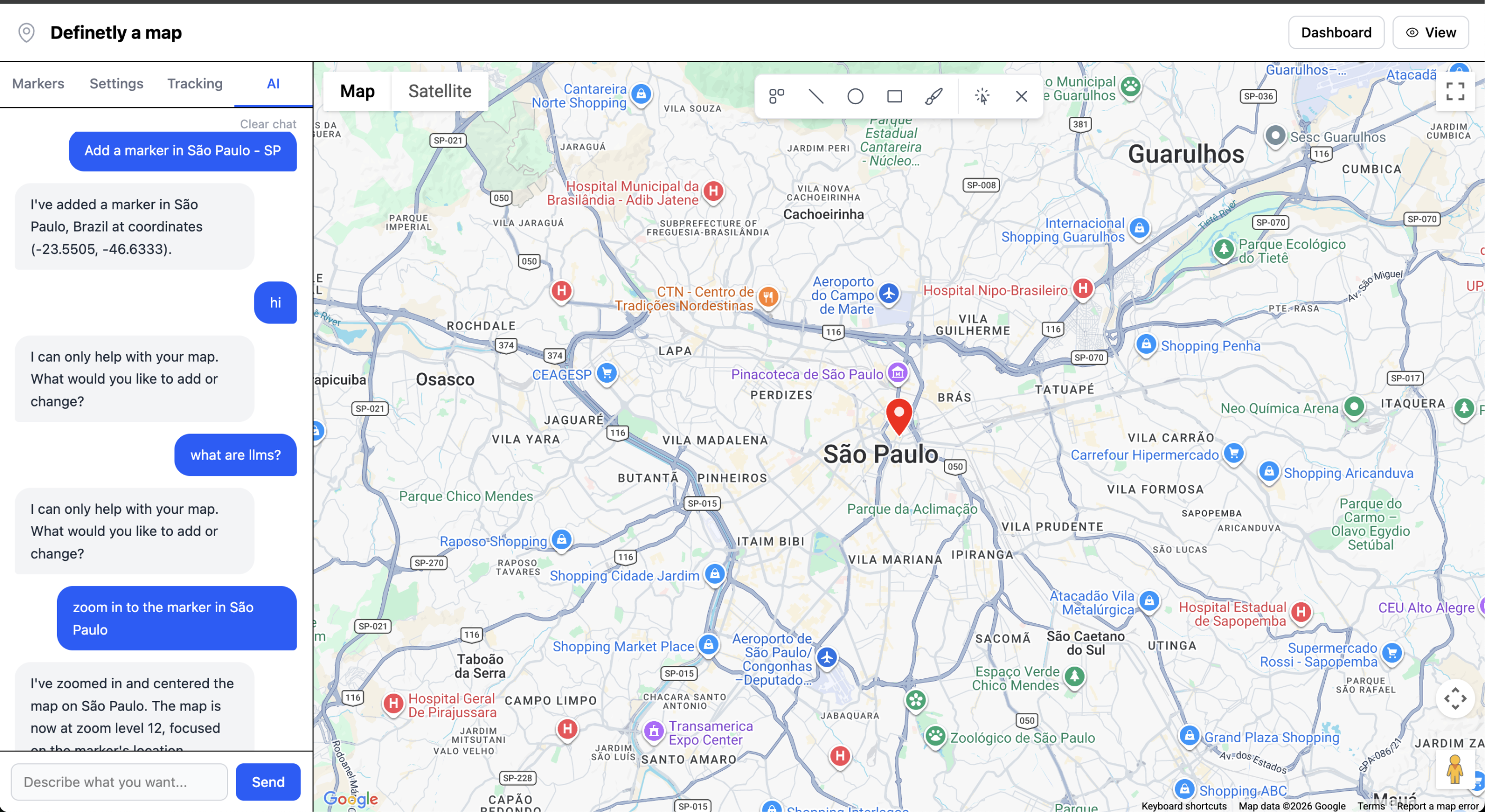
Meta: an AI building the app’s AI feature.
The problems here were all about integrating with RubyLLM. Tool names are auto-derived from the class name with the module prefix (ai_tools--create_marker), which broke tool use. I needed a manual override. The params DSL uses desc: instead of description: - the AI got that wrong 3 times before I told it to read the gem’s documentation.
And RubyLLM has no limit on tool use iterations. Without a guard in the on_tool_call callback, the model gets stuck in an infinite loop creating markers. That one I had to anticipate and ask for explicitly.
Phase 6: Email verification
The most “normal” phase - email verification with a 7-day deadline, warning banner, lockout after expiration, letter_opener_web for dev.
Here the AI did everything on its own without drama. Standard feature, clean pattern.
The numbers
At the end of day 5:
| Metric | Value |
|---|---|
| Commits | 61 |
| Tests | 507 (1297 assertions) |
| Coverage | 96% lines, 85% branches |
| Ruby (app/) | ~2,250 lines |
| JavaScript | ~3,170 lines |
| ERB templates | ~2,165 lines |
| Tests | ~4,690 lines |
| Deploy | GCP VM, Kamal 2, zero-downtime |
The AI wrote every line. I didn’t open a text editor even once.
What AI does well
Structural code. Controllers, services, models, migrations, routes, tests - the bread and butter of Rails. Fast, consistent, following the patterns I defined.
Keeping conventions. Once I established the service class rule, Claude never broke it. It kept namespaces, .call patterns, the :: prefix for top-level constants inside namespaces - all consistent across 61 commits.
Tests. The AI wrote 507 tests. And they weren’t make-believe tests - they were tests that caught real bugs. When I asked for a new feature, it wrote the tests along with it and ran them to make sure they passed.
Repetitive, boring tasks. CRUD, fixtures, test helpers, Stimulus controller boilerplate. Things you know how to do, but that take time.
Exploring APIs. Even when the documentation is obscure, the AI can explore the API, going as far as reading the source code of gems and libraries to understand how to use them. It’s something I used to do, but the AI does it better and faster.
What AI does poorly
Knowing when to stop. Sometimes the agent tries to go beyond the defined scope or reaches for overly complex solutions. One example I remember is when Claude suggested using Thread.current to share state between controllers. It didn’t realize that was a bad idea, and that there were simpler solutions.
Working around instead of fixing. The AI’s instinct is to try to fix the root cause, even when the pragmatic solution is to work around it. The Terra Draw readonly case is an example: the solution wasn’t “fix Terra Draw”, it was “don’t use Terra Draw in that context”. I had to give it that direction.
What I learned: good dev practices are good AI practices
This is the most unexpected conclusion of the experiment. Everything a competent developer already does - and that we sometimes treat as “bureaucracy” - is exactly what makes AI work well. It’s no coincidence. These practices exist because they make the job easier for whoever doesn’t have the full context in their head. And AI is exactly that: someone without context who needs clear guidance.
Have a plan
I didn’t start by opening the terminal. I started by writing a document with phases, features, stack, architecture decisions. Before asking the AI for anything, I knew what I wanted.
Without a plan, every session turns into a brainstorm. The AI has no opinion on what to do first - it does what you ask. If you don’t know what to ask for, the result is code that goes all over the place.
The plan doesn’t need to be perfect. Mine changed several times. But having a direction is the difference between building a product and generating random code.
Make small changes
61 commits in 5 days averages 12 commits a day. Each commit was a coherent unit: a feature, a fix, a refactor. Not a giant commit called “changes”.
This matters for two reasons. First, the AI makes fewer mistakes when the scope is small. Asking “implement the complete tracking system” will cause trouble. Asking “create the TrackedVehicle model with webhook_token and active flag” works on the first try.
Second, small commits are save points. When the AI screws up (and it will), you have somewhere to go back to. Several times I asked it to revert an approach and start over from an earlier commit. If everything were in a single commit, there’d be no way.
This is the same advice every software engineering book gives. Nothing new. But with AI, the consequence of ignoring that advice is amplified.
Update the documentation on every iteration
Claude Code has a memory file where it keeps context between sessions. After each phase, I asked it to update it: which decisions were made, which traps we ran into, which patterns we established.
In practice, it was like keeping a CLAUDE.md (or AGENTS.md, or whatever name) up to date. When a new session started, the AI read that file and already knew: “ah, controllers use service classes, Terra Draw can’t run in readonly, RubyLLM tool names need a manual override.”
Without that documentation, every session would start from zero. The AI doesn’t remember what it did yesterday. It reads the code and the docs. If the docs are outdated, it will repeat the same mistakes.
This is identical to what happens with human devs on a team. If there are no docs, the new dev will make the same mistakes the team already solved. AI is the eternal new dev - it always needs context.
Write code that’s easy to change
Service classes with a single responsibility. Thin controllers. Shared utility modules. Clear names. Tests.
Just because the AI wrote the code doesn’t mean it can be messy. Actually, it’s the opposite: well-structured code is easier for AI to understand and modify. When I asked for a change in an isolated service class, the AI got it right the first time. When the change involved coupled code, it stumbled.
Maintainable code isn’t vanity. It’s pragmatism. It makes changes easier - for humans and for AI alike.
Tests are not optional
507 tests. Every new feature came with tests. The AI ran bin/rails test after every change and fixed whatever failed.
That saved me more times than I can count. The AI sometimes makes a change that breaks something somewhere else - something it doesn’t notice because it doesn’t have the full context. The tests catch it. Without them, those bugs would silently go to production.
AI as an amplifier
Back to the central point: AI is an amplifier of the developer you already are.
If I didn’t know service classes are a good idea for this kind of app, the AI wouldn’t have suggested them. If I didn’t know Terra Draw crashes in readonly, we would have been stuck for hours. If I didn’t have a plan with clear phases, every session would have been aimless chaos.
The plan came from me. The architecture decisions came from me. Identifying the problems came from me. The AI executed.
Fred Brooks, in the essay No Silver Bullet, draws the distinction between essential and accidental complexity in software. The essential part is the conceptual one - the structures, the logic, the relationships between things. The accidental part is the mechanical one - syntax, tools, languages. AI solves a good chunk of the accidental complexity. The essential part is still yours.
If you’re a dev who knows how to make decisions, sequence work, and keep code clean - AI turns you into a machine. If you don’t have that foundation, it will amplify the lack of it. It will generate code that looks like it works but is poorly structured, untested, with the wrong abstractions, and that turns into a nightmare at the first change.
The developer of the future isn’t the one who types fastest. It’s the one who thinks best.
MapWise isn’t ready for customers yet - it still needs a domain and email delivery in production. But the app is deployed, working, with 507 passing tests and zero-downtime deploys. The point isn’t that it’s perfect - it’s that an AI agent delivered production software. Not a prototype, not a demo, not a throwaway “vibe coding” project. Real software, with real architecture, tested, deployed.
And I’m not the only one. Fábio Akita shipped a product from zero to production in 6 days (in Portuguese) - and it already has subscribers. Bun wasn’t built with AI, but today it uses it heavily: Bun’s creator, Jarred Sumner, said on X that they’ve merged at least 84 PRs from Claude in a month.
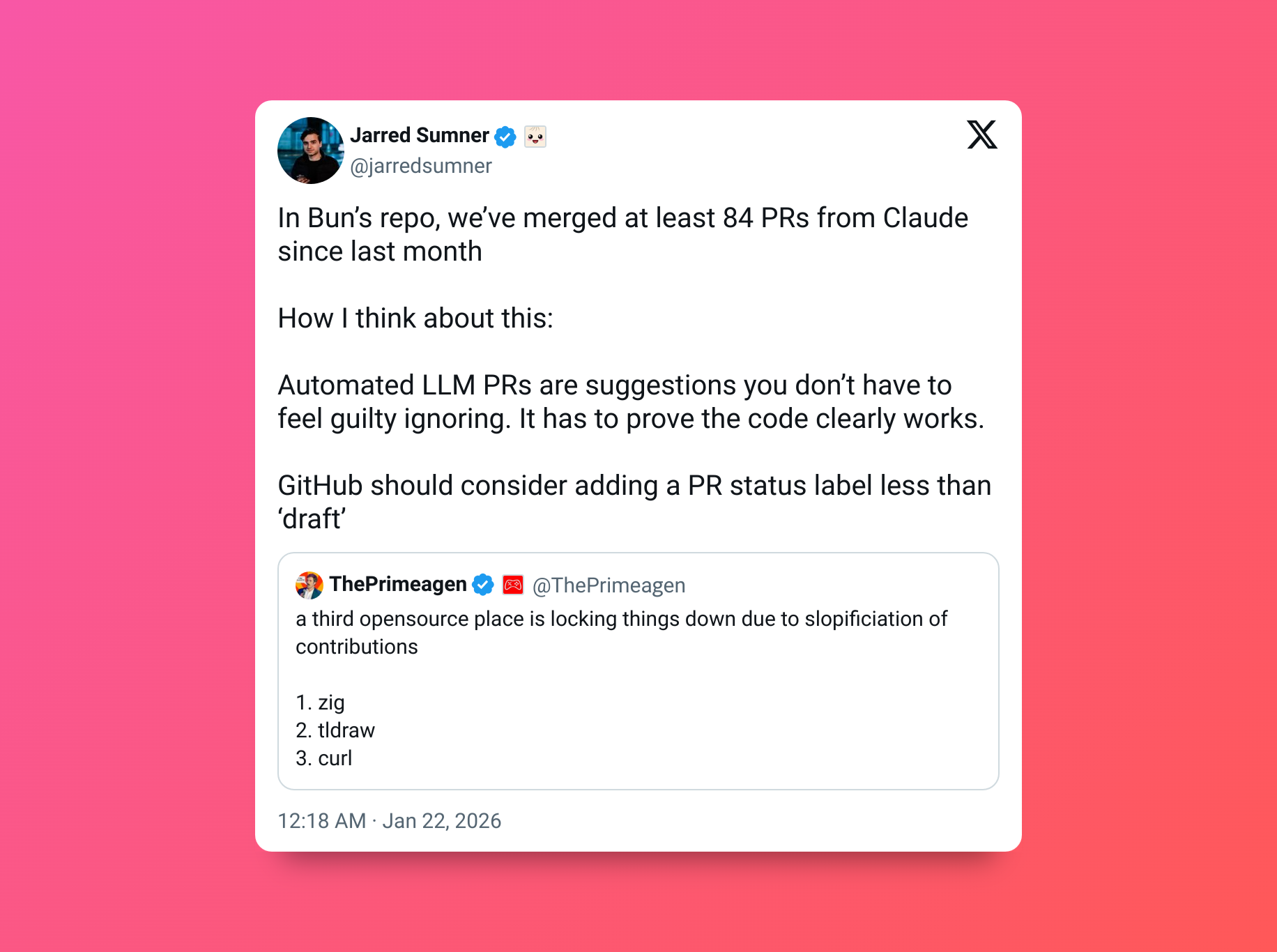
This is no longer an isolated experiment. It’s an emerging pattern: experienced devs using AI as leverage to ship entire products in days, not months.
The mechanical part is being automated. The part that demands judgment, experience and vision is going to be the differentiator.
And look - I built an entire production app in 5 days. Alone. With AI. This isn’t the future. This is already the present.
Thanks for reading!